• Connect to O365 using Powershell (Windows Azure Active Directory Module )

    Connect to O365 using Powershell (Windows Azure Active Directory Module )

    So you need a quick way to connect to o365 to manage email for either yourself or your clients?
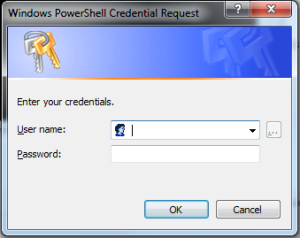
    Connect to O365 using Powershell (Windows Azure Active Directory Module )Load up the Azure Directory module, link below:
    http://go.microsoft.com/fwlink/p/?linkid=236297

    Type (or copy/paste):
    $msolcred = get-credential
    connect-msolservice -credential $msolcred


    It will then prompt for your Office 365 administrators user/pass.
    Hit enter,

    You are now connected to your admin console and can now use a whole host of available cmdlets in order to quickly and effectively manage your exchange and Office365 back-end.

    See <link to post> for my Top Five Office 365 Powershell commands


  • Which Exchange services to restart without needing a server reboot

    Here is which exchange services to restart in order to completely refresh an on-site exchange installation

    1) Microsoft Exchange Active Directory Topology Service (this will toggle all the core AD Exchange services minus the below)

    2) Microsoft Exchange Information Store

    3)Microsoft Exchange System Attendant

    exchange services

    With all that complete you should be all ready to go and continue trouble shooting/upgrading/modifying whatever it was you need to work on. Hopefully though if you hd any issues, this should have resolved them for you.


  • Top 5 Obvious but little known useful cmdlets and IT support tricks

    As an IT technician, I am often adding new quick tricks to my mental shorcuts list, here are my current top 5:

    1. Need to log onto a domain as the local PC admin but don’t know the PC name?
      Simply use ” .\” at the start of the admin username to log on as a local PC user.
    2. Powershell if PC has trust relationship
      Test-ComputerSecureChannel –Server *dc name* -Verbose
    3.  shutdown /i (-i ) remote shutdown
    4. Create big dummy file:
      Cd \sysinternalssuite
      Contig -n 2gbEmptyFile.txt 20000000
    5. For Spooler Crashes, first try below to clear all jobs
      net stop spooler
      pause
      del /S /F “C:\Windows\System32\spool\PRINTERS\*”
      net start spooler
      pause

    ::end


Latest Posts: _