Stop “installing” autonomous AI agents on your daily driver. You are doing it wrong. Our hero, Jolty (Zoë Roth AKA Disaster Girl) being told to ‘gonnae no dae that!’ a beautiful Scottish expression (please don’t do that) as a fire blazes in the background. This phrase perfectly sums up my feelings on MoltBot and the…
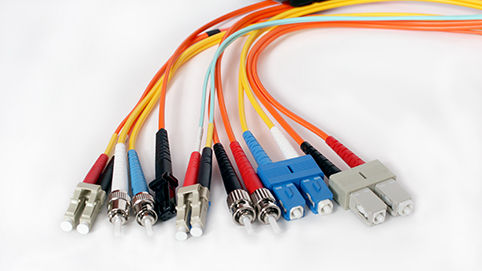
Fibre optic connectors are used to join two fibre optic cables together or to connect a fibre optic cable to a device such as a router or switch. There are many different types of fibre optic connectors available, each with its own unique features and applications. Here are some of the most common types:
SC Connectors: SC connectors are a popular choice for use in telecommunications and networking applications. They feature a push-pull design and use a snap-in mechanism to secure the connection.
LC Connectors: LC connectors are similar to SC connectors, but they are smaller in size and more compact. They are often used in high-density installations where space is at a premium.
ST Connectors: ST connectors are a legacy type of fibre optic connector that is still in use today. They feature a bayonet-style locking mechanism and are commonly used in networking and telecom applications.
FC Connectors: FC connectors are a popular choice for use in high-performance applications such as data centers and labs. They feature a threaded design for secure connections and are resistant to vibration and temperature changes.
MTP/MPO Connectors: MTP/MPO connectors are used for multi-fibre cables and are commonly used in data center and telecom applications. They feature a high-density design and use a push-pull mechanism to secure the connection.
Each type of fibre optic connector has its own unique features and benefits. It is important to choose the right connector for your specific application to ensure a reliable and efficient connection.
Fibre multiplexing is a technique used to transmit multiple streams of data over a single fiber optic cable. This allows for a large amount of data to be transmitted efficiently and quickly.
Imagine you have a bunch of different colored pencils, and you want to send them all to your friend who lives far away. One way to do this would be to pack each pencil into a separate box and send it through the mail. This would work, but it would take a lot of time and be expensive to send all those boxes.
Instead, you could put all the pencils into one big box and send them all at once. This is like what fibre multiplexing does with data. Instead of sending each piece of data separately, fibre multiplexing combines many different pieces of data into one big bundle and sends them all together through a fiber optic cable. This way, you can send a lot of data very quickly and efficiently.
There are several different methods of fibre multiplexing, including time-division multiplexing (TDM), wavelength-division multiplexing (WDM), and dense wavelength-division multiplexing (DWDM). These methods differ in how they combine the multiple streams of data, but the basic concept is the same: using a single fiber optic cable to transmit multiple streams of data simultaneously.
Fibre multiplexing is used in a variety of applications, including telecommunications, internet service providers, and cable TV. It is an important technology that allows us to transmit large amounts of data over long distances quickly and efficiently.
I recently had to write out a list of pro’s and con’s to present to a client who just couldn’t work out why VLANS would work out cheaper than separate physical networks. In doing this i reminded myself that whilst VLANS do give alot more control, there are maybe quite a few situations where seperate physical networks could be more beneficial. It’s not all black and white. Here is the shortened version of the list i came up with:
Pros of using VLANs:
Flexibility: VLANs allow you to segment your network into different logical networks, which can be useful for separating different types of traffic or users. This can make it easier to manage and secure your network.
Cost savings: Using VLANs can be more cost-effective than setting up separate physical networks, as you can use a single network infrastructure to support multiple logical networks.
Simplicity: VLANs can make it easier to manage and troubleshoot your network, as you can isolate different types of traffic and users into different logical networks.
Cons of using VLANs:
Complexity: VLANs can add complexity to your network, as you need to configure and manage the VLANs themselves.
Limited scalability: VLANs can be limited in terms of how many devices can be assigned to a single VLAN.
Performance: VLANs can introduce some overhead and reduce performance compared to using separate physical networks.
Pros of using separate physical networks:
Simplicity: Using separate physical networks can be simpler to set up and manage than using VLANs.
Performance: Separate physical networks can offer better performance than VLANs, as there is no overhead introduced by the VLANs.
Cons of using separate physical networks:
Cost: Setting up separate physical networks can be more expensive than using VLANs, as it requires additional hardware and infrastructure.
Inflexibility: Separate physical networks offer less flexibility than VLANs, as you cannot easily segment your network into different logical networks.
Difficulty in managing and troubleshooting: Managing and troubleshooting separate physical networks can be more difficult than using VLANs, as you need to manage multiple physical networks rather than a single network infrastructure with multiple logical networks.
Here are a couple examples, the first is
When Vlans are preferable:
Imagine that you are setting up a network for a large office building with multiple departments. Each department has its own set of servers, workstations, and other network devices, and you want to ensure that the traffic from each department is kept separate from the others.
One option would be to set up separate physical networks for each department. However, this would be costly and inflexible, as it would require setting up separate network infrastructure for each department. Additionally, managing and troubleshooting multiple physical networks would be more complex than managing a single network infrastructure.
Instead, you could use VLANs to segment the network into different logical networks, one for each department. This would allow you to use a single network infrastructure to support multiple logical networks, while still keeping the traffic from each department separate. This would be more cost-effective and flexible than using separate physical networks, and it would be simpler to manage and troubleshoot.
When Separate physical networks are preferable:
Imagine that you are setting up a network for a large warehouse that will be used to store and track inventory. The warehouse will have a large number of sensors, RFID scanners, and other IoT devices that will be sending and receiving large amounts of data.
In this case, using VLANs to segment the network into different logical networks might not be sufficient to handle the large volumes of data being transmitted by the IoT devices. VLANs can introduce some overhead and reduce performance compared to using separate physical networks, so using separate physical networks might be necessary to ensure that the IoT devices have the bandwidth and latency they need.
Additionally, the warehouse network might be too large or complex to manage effectively using VLANs, in which case using separate physical networks might be simpler and more effective.
If you are considering using the UniFi controller software to manage your network, you may be wondering whether to use a self-hosted UniFi server or a Cloud Key or other UniFi server. In this post, we’ll take a look at the pros and cons of each option to help you make an informed decision.
First, let’s define what we mean by a self-hosted UniFi server. A self-hosted UniFi server is a dedicated Linux server that runs the UniFi controller software. This allows you to manage your UniFi network using the UniFi controller software on your own server, rather than using a cloud-based server or a dedicated hardware device like a Cloud Key.
Now, let’s compare the pros and cons of using a self-hosted UniFi server vs a Cloud Key or other UniFi server.
Pros of a Self-Hosted UniFi Server
Greater control: With a self-hosted UniFi server, you have complete control over the server and the UniFi controller software. This allows you to customize the software and configure it to meet your specific needs. You can also choose your own hardware and operating system for the server, giving you more flexibility and options.
No subscription fees: A self-hosted UniFi server does not require a subscription fee, unlike some cloud-based UniFi servers. This can save you money in the long run, especially if you have a large network or multiple locations.
On-site management: With a self-hosted UniFi server, you can manage your network on-site, which can be convenient if you have a large network or multiple locations. This also allows you to manage your network even if you don’t have an internet connection, which can be useful in certain situations.
Cons of a Self-Hosted UniFi Server
Initial setup: Setting up a self-hosted UniFi server requires some technical expertise and can be time-consuming. You’ll need to install the UniFi controller software on a dedicated Linux server and configure it to your liking. This can be a challenge if you don’t have experience with Linux servers or the UniFi controller software.
Maintenance: As with any server, a self-hosted UniFi server requires regular maintenance and updates to keep it running smoothly. This can be time-consuming and may require additional technical expertise, depending on the complexity of your network. You’ll also need to make sure the server is backed up and secure to protect against data loss or cyber threats
Pros of a Cloud Key or Other UniFi Server
Easy setup: A Cloud Key or other UniFi server is a dedicated hardware device that comes pre-configured with the UniFi controller software. This makes it easy to set up and get started with the UniFi controller software, even if you don’t have much technical expertise. You simply plug the device into your network and follow the instructions to connect it to the UniFi controller software.
No maintenance: A Cloud Key or other UniFi server requires very little maintenance. The UniFi controller software is pre-installed and updates are handled automatically, so you don’t have to worry about keeping it up to date. This can save you time and hassle, especially if you don’t have a dedicated IT staff or expertise in networking.
Remote management: With a Cloud Key or other UniFi server, you can manage your network remotely using the UniFi controller software. This is convenient if you have a large network or multiple locations, as you can manage everything from a single interface. You can also access the UniFi controller software from any device with an internet connection, which can be useful when you’re on the go.
Cons of a Cloud Key or Other UniFi Server
Subscription fees: Some cloud-based UniFi servers, including the Cloud Key, require a subscription fee. This can add up over time, especially if you have a large network or multiple locations. Be sure to factor in any subscription fees when comparing the costs of different UniFi servers.
Limited customization: With a Cloud Key or other UniFi server, you have limited control over the UniFi controller software and the hardware. You can’t customize the software or choose your own hardware, which may be a drawback if you have specific requirements or preferences. You’ll also be limited to the features and capabilities of the UniFi controller software as it is provided, which may not meet all of your needs.
Dependency on internet connection: A Cloud Key or other UniFi server requires an internet connection to access the UniFi controller
Conclusion
As you can see, there are pros and cons to both self-hosted UniFi servers and Cloud Keys or other UniFi servers. Ultimately, the best choice for your business will depend on your specific needs and resources. If you have a large, complex network and want complete control over the UniFi controller software and hardware, a self-hosted UniFi server may be the best option. On the other hand, if you have a smaller network or less technical expertise, a Cloud Key or other UniFi server may be more convenient and cost-effective. Consider your budget, technical capabilities, and networking needs carefully when deciding which UniFi server is right for you.
![[Opinion] STOP INSTALLING OPENCLAW (MOLTBOT) ON YOUR PC/MAC: How to Safely ‘Hire’ AI Agents via Cloud VPS](https://cannotdisplay.com/wp-content/uploads/2026/02/moltbot-banner-1024x435.png)
![[Solved] Help! Windows 365 Cloud PC Switch Feature Has Frozen My Local Host PC.](https://cannotdisplay.com/wp-content/uploads/2025/12/Win365-Cloud-PC-via-Switch-1024x214.png)