DMARC with quotes or without? [SOLVED]

Does my DMARC record need to include quotation marks or not?

9/10 times, no quotes are needed.

However, this all depends on where you edit your DNS.

In the raw DNS zone file, which is what is passed from machine to machine, the .txt record DOES need to be enclosed in quotation marks if it contains spaces. It is unlikely that your domain/DNS provider however will give you direct edit access to this, and instead will be providing their own interface to edit entries with pre-built in quotation marks. Exceptions to this can be found when directly editing via CLI at the root of a server, or when using the raw edit mode on WHM.

For example, Cloudflare will automatically wrap any string of text in a .TXT record in quotes for you, and remove extra quotes you may add,

namesco however will not automatically remove extra quotations to their already provided ones – which could lead to double quotations, and issues further down the line.

It pretty much boils down to your provider, it is best to have a quick skim of their DNS Q&A section – or to test by trial and error!

My favorite testing site is currently https://mxtoolbox.com/DMARC.aspx

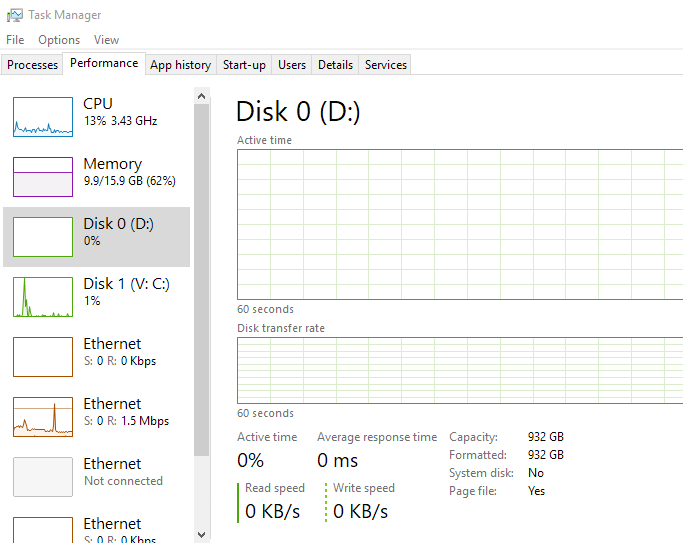
Enable disk performance in task manager, Windows Server

Can’t see the disk performance in task manager on a Windows Server?

There is multiple factors for disk performance not showing up, including raid cards, the server being nested on a HV or running as a VM, there is a simple quick fix though;

Step 1)
Open Elevated Command Prompt

Step 2)
Start disk performance counters:
diskperf –y

disk in task manager

With any luck, that should be it now showing in Task manager, if it does not, close and re-open it for the disk performance indicators to appear.
On occasion, you may need to re-install/install the latest raid card drivers if they are missing in order for the disk performance indicators to read and run correctly.

[SOLVED] Manually Register Acronis Backup Client for Backup Cloud

Manually Register Acronis Backup

Occasionally a backup client will disconnect, or cannot connect in the first place to obtain its backup set and process its jobs.
With pre-provisioning systems, this is often the case for certainly Mac and Linux machines.

Solution

(!) IMPORTANT: This method is NOT supported for registration of Agent for VMware (Windows)

Manually Register Acronis Backup client.
Use quotation marks, if your password contains special characters or spaces.

Windows OS
1. Open Command prompt and navigate to C:\Program Files\BackupClient\BackupAndRecovery: 
cd “C:\Program Files\BackupClient\BackupAndRecovery”
2. Issue this command to register the client machine: 
register_msp_mms.exe register https://cloud.acronis.com 

Linux OS
1. Open terminal as root user
2. Type in the following command to register the agent:
/usr/lib/Acronis/BackupAndRecovery/AmsRegisterHelper register https://cloud.acronis.com 

OS X
1. Open terminal.
2. Execute:
sudo -u root “/Library/Application Support/BackupClient/Acronis/BackupAndRecovery/AmsRegisterHelper” register https://cloud.acronis.com 

From

NB: if you are outwith the normal Acronis Data Centres, as i was, then replace the cloud.acronis.com URL with the URL you use to log into your dashboard. i.e. https://eu-cloud.acronis.com

[Solved] Set up a Raspberry Pi as a window display (kiosk mode)

Kiosk mode, or running big display to show ads, or company info is a big field in IT.
Sure there are multiple services and companies who will come out and install you a fancy system that you email them to update and all, but what if you just want a low cost, low energy installation that you have full control of?

Well, this was my predicament.

Below is how i set up a Raspberry Pi to run a 4K TV which was then placed on a pole mount in the window of a customers shop. (in fact i have now installed over 13 of these at various locations, all of which require minimal interaction, and are very energy efficient.

The basis is this;
1) Create info/powerpoints/video’s or whatever you wish to display in/on a managed website/url.
2) Have a low powered RPi display that simply boots straight into the website/url of your choice.

The reasons i have chosen this path are many, but the pro’s include, being able to modify and push the content on the fly, without ever having to touch or reconfigure the display or Pi and having the Pi set up in a fool proof way that even if there is a power interruption, the pi automatically reboots and runs where it left off.

Set up a Raspberry Pi as a window display (kiosk mode)

Download Image & Install

Raspbian


Raspbian Latest (Stretch)

Necessary Software for Kiosk Mode
sudo apt-get update
sudo apt-get dist-upgrade
sudo apt-get install matchbox x11-xserver-utils ttf-mscorefonts-installer xwit sqlite3 libnss3

Then reboot : sudo reboot
Installation of libgcrypt11
wget http://ftp.acc.umu.se/mirror/cdimage/snapshot/Debian/pool/main/libg/libgcrypt11/libgcrypt11_1.5.3-5_armhf.deb
sudo dpkg -i libgcrypt11_1.5.3-5_armhf.deb

Installation of Chromium browser 48
sudo apt-get install chromium

# Download ffmpeg extra package
wget http://launchpadlibrarian.net/234969705/chromium-codecs-ffmpeg-extra_48.0.2564.82-0ubuntu0.15.04.1.1193_armhf.deb
sudo dpkg -i chromium-codecs-ffmpeg-extra_48.0.2564.82-0ubuntu0.15.04.1.1193_armhf.deb \
Chromium-browser_48.0.2564.82-0ubuntu0.15.04.1.1193_armhf.deb

Configure Chromium Kiosk autostart:

nano .config/lxsession/LXDE-pi/autostart


@lxpanel --profile LXDE-pi
@pcmanfm --desktop --profile LXDE-pi
@chromium-browser --kiosk --disable-session-crashed-bubble --disable-infobars http://YOUR WEBSITE URL

Hit ctrl+o , ctrl+x

Disable Screen Saver
apt-get install Xscreensaver
Set to disable screensaver

Hide Cursor
Get package:
Sudo apt-get install unclutter
Run unclutter:
Unclutter -display :0 -noevents -grab

Resolution Setup:
sudo nano /boot/config.txt

Add in just under: display_rotate=1 (Or “display_rotate=0” for vertical boards)

resolution 82 1920x1080 60Hz 1080p
Or whatever resolution your Video’s/display will be showing


hdmi_ignore_edid=0xa5000080
hdmi_force_hotplug=1
hdmi_boost=7
hdmi_group=2
hdmi_mode=82
hdmi_drive=1

[Resolved] Find the startup folder in windows 10

Need to find the startup folder in windows 10?

Since Windows 8, the startup folder has been an elusive beast, but fear not, this simple command will force it to reveal itself in no time at all.

1) Win + R
2) shell:startup
3) Enter/OK

find startup folder location win 10 shell:startup

Or the path for the startup folder in windows 10:
"C:\Users\%USERNAME%\AppData\Roaming\Microsoft\Windows\Start Menu\Programs\Startup"

startup folder in windows 10

Powershell Migration Series | Setting bulk forwarding using powershell

Powershell Migration Series

Setting bulk forwarding using powershell

Whilst doing my migration, i want to set up the mailbox so that i can forward any new massages to O365 from the local exchange, after i have done the bulk of mail migration. In order to do this, we utilise the .onmicrosoft.com address space that O365 can provide each email user.

The plan is simple, forward mail from local exchange @contoso.com to O365 @contoso.onmicrosoft.com

Once you have created the contacts, the next step is Setting bulk forwarding using powershell

1) Create another CSV, this time in the following format,

DisplayName,MailAddress

DisplayName = the username in exchange, e.g. “Joe Bloggs”
Mail Address = Forwarding address @contoso.onmicrosoft.com address

Save it as “ForwardingAddresses.csv”

2) Run the following which creates the bulk forwarding using powershell

Import-Csv c:\scripts\ForwardingAddresses.csv | Foreach-Object{Get-Mailbox $_.DisplayName | Set-Mailbox -ForwardingAddress $_.MailAddress}

Now for me, i needed it to deliver to both the exchange mailbox and to forward to the O365 mailbox, if you need it to deliver to the mailbox AND forward, add the below switch to the end of the above before the last curley bracket }

-DeliverToMailboxAndForward $true

Final script i ran:

Import-Csv c:\ws\ForwardingAddresses.csv | Foreach-Object{Get-Mailbox $_.DisplayName | Set-Mailbox -ForwardingAddress $_.MailAddress -DeliverToMailboxAndForward $true}

Setting bulk forwarding using powershell

Powershell Migration Series | Creating bulk contacts with powershell

Powershell Migration Series

Creating bulk contacts with powershell

Whilst doing my migration, i want to set up the mailbox so that i can foward any new massages to O365 from the local exchange, after i have done the bulk of mail migration. In order to do this, we utilise the .onmicrosoft.com address space that O365 can provide each email user.

The plan is simple, forward mail from local exchange @contoso.com to O365 @contoso.onmicrosoft.com

To do so, on the local exchange there is two steps,

1) create CSV with the following format and your contact data:

Firstname,LastName,ExternalEmailAddress

Save as external_users.csv

2) Run the following which creates the bulk contacts with powershell

Import-Csv “C:\scripts\external_users.csv” | ForEach {New-MailContact -Name $_.Name -Firstname $_.FirstName -LastName $_.LastName -ExternalEmailAddress $_.ExternalEmailAddress -OrganizationalUnit “DOMAIN.local/MyBusiness/Users/SBSUsers/Contacts”}

replace: “DOMAIN.local/MyBusiness/Users/SBSUsers/Contacts” with the OU you wish the contacts to be created in.

Creating bulk contacts with powershell

You then need to set up the forwarding within exchange, now you have already done the contacts using powershell, why not set forwarding with powershell also?

Printer fix script – Quickly clear print queues and restart print spooler

printer fix script

Printers are the bain of any helpdesk engineer, or actually any one in IT in general!

Here is a quick printer fix script to help:

Whilst basic, (restart spooler and clear all print queues) it does in our office, at least, clear 99% of printer issues.

Copy and paste the below to a batch file (file extension .bat) and click away:

::Printer Fix Script @cannotdisplay.com
net stop spooler
pause
del /S /F “C:\Windows\System32\spool\PRINTERS\*”
del /S /F “C:\Windows\System32\spool\SERVERS\*”
net start spooler
pause
::end

It will prompt you several times to make sure you wish to delete queues and then pause at the end to show you how it went,
Any alterations or suggestions comment below!