Pros and Cons of using VLANS over separate physical networks

I recently had to write out a list of pro’s and con’s to present to a client who just couldn’t work out why VLANS would work out cheaper than separate physical networks. In doing this i reminded myself that whilst VLANS do give alot more control, there are maybe quite a few situations where seperate physical networks could be more beneficial. It’s not all black and white. Here is the shortened version of the list i came up with:

Pros of using VLANs:

  • Flexibility: VLANs allow you to segment your network into different logical networks, which can be useful for separating different types of traffic or users. This can make it easier to manage and secure your network.
  • Cost savings: Using VLANs can be more cost-effective than setting up separate physical networks, as you can use a single network infrastructure to support multiple logical networks.
  • Simplicity: VLANs can make it easier to manage and troubleshoot your network, as you can isolate different types of traffic and users into different logical networks.

Cons of using VLANs:

  • Complexity: VLANs can add complexity to your network, as you need to configure and manage the VLANs themselves.
  • Limited scalability: VLANs can be limited in terms of how many devices can be assigned to a single VLAN.
  • Performance: VLANs can introduce some overhead and reduce performance compared to using separate physical networks.

Pros of using separate physical networks:

  • Simplicity: Using separate physical networks can be simpler to set up and manage than using VLANs.
  • Performance: Separate physical networks can offer better performance than VLANs, as there is no overhead introduced by the VLANs.

Cons of using separate physical networks:

  • Cost: Setting up separate physical networks can be more expensive than using VLANs, as it requires additional hardware and infrastructure.
  • Inflexibility: Separate physical networks offer less flexibility than VLANs, as you cannot easily segment your network into different logical networks.
  • Difficulty in managing and troubleshooting: Managing and troubleshooting separate physical networks can be more difficult than using VLANs, as you need to manage multiple physical networks rather than a single network infrastructure with multiple logical networks.

Here are a couple examples, the first is

When Vlans are preferable:

Imagine that you are setting up a network for a large office building with multiple departments. Each department has its own set of servers, workstations, and other network devices, and you want to ensure that the traffic from each department is kept separate from the others.

One option would be to set up separate physical networks for each department. However, this would be costly and inflexible, as it would require setting up separate network infrastructure for each department. Additionally, managing and troubleshooting multiple physical networks would be more complex than managing a single network infrastructure.

Instead, you could use VLANs to segment the network into different logical networks, one for each department. This would allow you to use a single network infrastructure to support multiple logical networks, while still keeping the traffic from each department separate. This would be more cost-effective and flexible than using separate physical networks, and it would be simpler to manage and troubleshoot.

When Separate physical networks are preferable:

Imagine that you are setting up a network for a large warehouse that will be used to store and track inventory. The warehouse will have a large number of sensors, RFID scanners, and other IoT devices that will be sending and receiving large amounts of data.

In this case, using VLANs to segment the network into different logical networks might not be sufficient to handle the large volumes of data being transmitted by the IoT devices. VLANs can introduce some overhead and reduce performance compared to using separate physical networks, so using separate physical networks might be necessary to ensure that the IoT devices have the bandwidth and latency they need.

Additionally, the warehouse network might be too large or complex to manage effectively using VLANs, in which case using separate physical networks might be simpler and more effective.

Unifi: self-hosted UniFi server or a Cloud Key or other UniFi server?

If you are considering using the UniFi controller software to manage your network, you may be wondering whether to use a self-hosted UniFi server or a Cloud Key or other UniFi server. In this post, we’ll take a look at the pros and cons of each option to help you make an informed decision.

First, let’s define what we mean by a self-hosted UniFi server. A self-hosted UniFi server is a dedicated Linux server that runs the UniFi controller software. This allows you to manage your UniFi network using the UniFi controller software on your own server, rather than using a cloud-based server or a dedicated hardware device like a Cloud Key.

Now, let’s compare the pros and cons of using a self-hosted UniFi server vs a Cloud Key or other UniFi server.

Pros of a Self-Hosted UniFi Server

  • Greater control: With a self-hosted UniFi server, you have complete control over the server and the UniFi controller software. This allows you to customize the software and configure it to meet your specific needs. You can also choose your own hardware and operating system for the server, giving you more flexibility and options.
  • No subscription fees: A self-hosted UniFi server does not require a subscription fee, unlike some cloud-based UniFi servers. This can save you money in the long run, especially if you have a large network or multiple locations.
  • On-site management: With a self-hosted UniFi server, you can manage your network on-site, which can be convenient if you have a large network or multiple locations. This also allows you to manage your network even if you don’t have an internet connection, which can be useful in certain situations.

Cons of a Self-Hosted UniFi Server

  • Initial setup: Setting up a self-hosted UniFi server requires some technical expertise and can be time-consuming. You’ll need to install the UniFi controller software on a dedicated Linux server and configure it to your liking. This can be a challenge if you don’t have experience with Linux servers or the UniFi controller software.
  • Maintenance: As with any server, a self-hosted UniFi server requires regular maintenance and updates to keep it running smoothly. This can be time-consuming and may require additional technical expertise, depending on the complexity of your network. You’ll also need to make sure the server is backed up and secure to protect against data loss or cyber threats

Pros of a Cloud Key or Other UniFi Server

  • Easy setup: A Cloud Key or other UniFi server is a dedicated hardware device that comes pre-configured with the UniFi controller software. This makes it easy to set up and get started with the UniFi controller software, even if you don’t have much technical expertise. You simply plug the device into your network and follow the instructions to connect it to the UniFi controller software.
  • No maintenance: A Cloud Key or other UniFi server requires very little maintenance. The UniFi controller software is pre-installed and updates are handled automatically, so you don’t have to worry about keeping it up to date. This can save you time and hassle, especially if you don’t have a dedicated IT staff or expertise in networking.
  • Remote management: With a Cloud Key or other UniFi server, you can manage your network remotely using the UniFi controller software. This is convenient if you have a large network or multiple locations, as you can manage everything from a single interface. You can also access the UniFi controller software from any device with an internet connection, which can be useful when you’re on the go.

Cons of a Cloud Key or Other UniFi Server

  • Subscription fees: Some cloud-based UniFi servers, including the Cloud Key, require a subscription fee. This can add up over time, especially if you have a large network or multiple locations. Be sure to factor in any subscription fees when comparing the costs of different UniFi servers.
  • Limited customization: With a Cloud Key or other UniFi server, you have limited control over the UniFi controller software and the hardware. You can’t customize the software or choose your own hardware, which may be a drawback if you have specific requirements or preferences. You’ll also be limited to the features and capabilities of the UniFi controller software as it is provided, which may not meet all of your needs.
  • Dependency on internet connection: A Cloud Key or other UniFi server requires an internet connection to access the UniFi controller

Conclusion

As you can see, there are pros and cons to both self-hosted UniFi servers and Cloud Keys or other UniFi servers. Ultimately, the best choice for your business will depend on your specific needs and resources. If you have a large, complex network and want complete control over the UniFi controller software and hardware, a self-hosted UniFi server may be the best option. On the other hand, if you have a smaller network or less technical expertise, a Cloud Key or other UniFi server may be more convenient and cost-effective. Consider your budget, technical capabilities, and networking needs carefully when deciding which UniFi server is right for you.

Running a company with a full Ubiquiti stack

Say you wanted to run a company completely using a Unifi stack, here are some examples of different products from Ubiquiti and potential use cases for a medium-sized business:

UniFi Access Points (APs)

These wireless APs offer high-performance Wi-Fi coverage and can be easily managed using the UniFi controller software. They are ideal for businesses that need to provide reliable Wi-Fi access to employees, guests, or customers in a variety of settings, such as offices, retail stores, or restaurants.

UniFi Switches

These managed switches offer a range of port configurations and advanced features, such as PoE (Power over Ethernet), VLAN tagging, and link aggregation. They are ideal for businesses that need to create a high-performance network infrastructure, such as for VoIP (Voice over IP) or video conferencing.

UniFi Security Gateway (USG)

This device combines a router, firewall, and VPN server in one compact package. It offers advanced security features, such as content filtering, intrusion prevention, and anti-malware protection. It is ideal for businesses that need to secure their network and protect against cyber threats.

UniFi Video Camera

These high-definition, network-attached cameras offer real-time video and audio monitoring, as well as advanced features like motion detection and night vision. They are ideal for businesses that need to enhance security or monitor their premises, such as warehouses or office buildings.

Self-Hosted UniFi Linux Server

A self-hosted UniFi Linux Server allows you to manage your UniFi network using the UniFi controller software on a dedicated Linux server. This offers advanced network management capabilities and can be particularly useful for businesses that need a high level of control over their network, such as those with multiple locations or remote workers.

Conclusion

In conclusion, using a full Ubiquiti stack to run your company’s network offers a range of benefits. The company’s high-quality, reliable products, wide range of options, scalability, ease of use, and affordable prices make it a solid choice for businesses looking to upgrade their networking capabilities. One of the key benefits of using a full stack of the same product is the ability to manage and maintain the network more efficiently. With all the same product, you can use the same management tools, such as the UniFi controller software, and benefit from consistent features and performance across the network. This can help streamline your company’s networking operations and reduce the risk of downtime or other issues. Consider switching to a full Ubiquiti stack to take advantage of these benefits and streamline your company’s networking operations.

Using Ubiquiti networking equipment in an enterprise environment

As a leading provider of networking equipment and software, Ubiquiti is a trusted choice for businesses of all sizes. In this post, we’ll take a look at why we recommend using Ubiquiti’s products in an enterprise environment.

High-quality, reliable products: Ubiquiti is known for its high-quality, reliable products, which are built to withstand the demands of an enterprise environment. The company’s routers, switches, and access points are designed to deliver fast, stable connections, even in high-traffic situations.

Wide range of products: Ubiquiti offers a wide range of networking products, including routers, switches, access points, and software. This allows enterprises to choose the best products for their specific needs, whether they are looking to upgrade their Wi-Fi network or build a new one from scratch.

Scalability: Ubiquiti’s products are designed to be scalable, which means they can grow with your business as your networking needs change. The company’s UniFi software, for example, makes it easy to add new access points or switches to your network as you expand.

Ease of use: Ubiquiti’s products are known for their ease of use, which is a major advantage in an enterprise environment where there may be multiple users with different levels of technical expertise. The company’s UniFi software, in particular, is user-friendly and intuitive, making it easy to set up, monitor, and manage your network.

Affordable prices: While enterprise-grade networking equipment can be expensive, Ubiquiti’s products offer a great combination of performance and value. The company’s products are typically more affordable than those of some of its competitors, making them a cost-effective choice for businesses of all sizes.

In conclusion, there are many good reasons to consider using Ubiquiti’s networking equipment in an enterprise environment. The company’s high-quality, reliable products, wide range of options, scalability, ease of use, and affordable prices make it an excellent choice for businesses looking to upgrade their networking capabilities.

DMARC with quotes or without? [SOLVED]

Does my DMARC record need to include quotation marks or not?

9/10 times, no quotes are needed.

However, this all depends on where you edit your DNS.

In the raw DNS zone file, which is what is passed from machine to machine, the .txt record DOES need to be enclosed in quotation marks if it contains spaces. It is unlikely that your domain/DNS provider however will give you direct edit access to this, and instead will be providing their own interface to edit entries with pre-built in quotation marks. Exceptions to this can be found when directly editing via CLI at the root of a server, or when using the raw edit mode on WHM.

For example, Cloudflare will automatically wrap any string of text in a .TXT record in quotes for you, and remove extra quotes you may add,

namesco however will not automatically remove extra quotations to their already provided ones – which could lead to double quotations, and issues further down the line.

It pretty much boils down to your provider, it is best to have a quick skim of their DNS Q&A section – or to test by trial and error!

My favorite testing site is currently https://mxtoolbox.com/DMARC.aspx

BGP vulnerable? – is the web as we know it at risk?

The BGP (protocol) has been on my mind the last few weeks.

It boggles my mind how fragile the web is that we all operate on, more specifically that we rely on BGP TCP/IP to maintain connections between two or more autonomous system routers.
BGP is simply put, is the Internet’s greatest weakness.

OK, so what is BGP?

According to he RFC (last pub 2006)

The primary function of a BGP speaking system is to exchange network
reachability information with other BGP systems.

GP-4 provides a set of mechanisms for supporting Classless Inter-
Domain Routing (CIDR) [RFC1518, RFC1519]. These mechanisms include
support for advertising a set of destinations as an IP prefix and
eliminating the concept of network “class” within BGP. BGP-4 also
introduces mechanisms that allow aggregation of routes, including
aggregation of AS paths.

Attacking it?

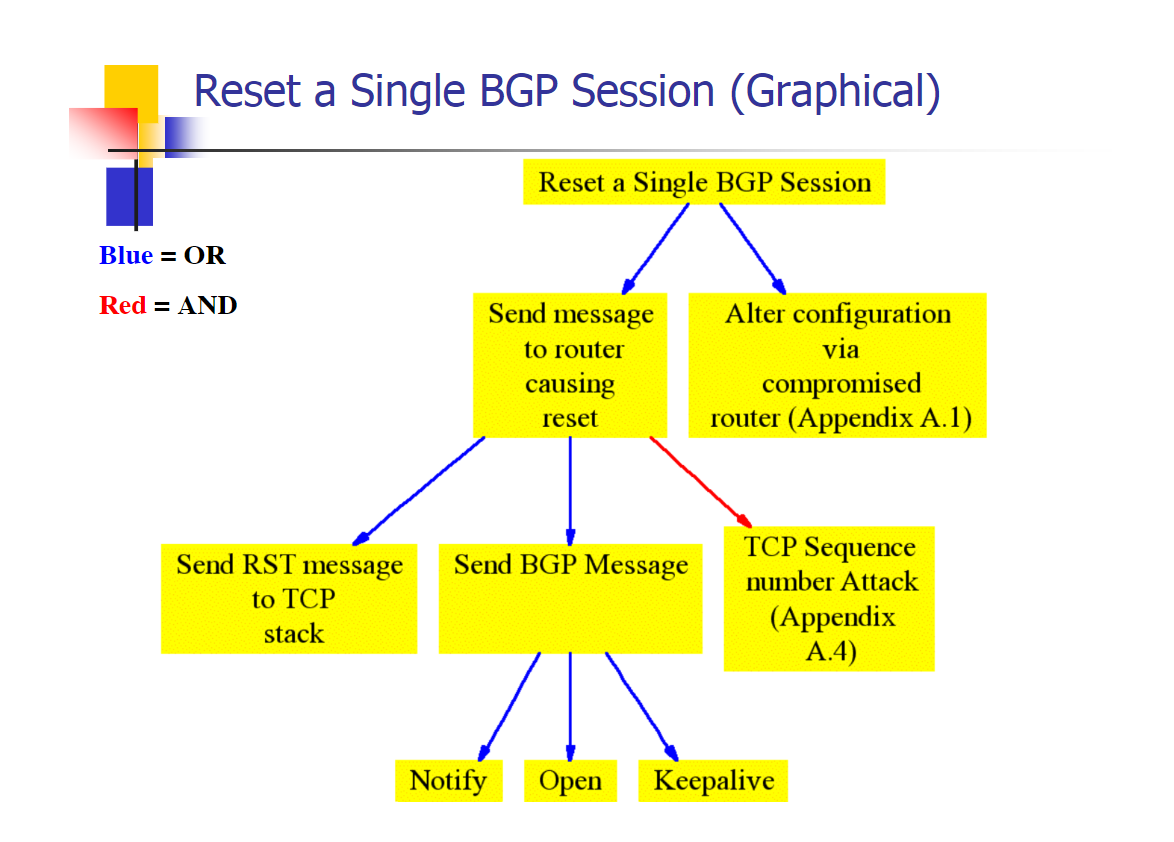
Acording to Sean Convery (cisco) from his blackhat talk in 2003 below is how you shoudld go about it (kindof, we will go into more detail later):
Reset a single BGP session to control a block of IP’s and corrupt other BGP routers. The easiest way to do this would be to gain lawful access to a BGP backbone, e.g. become an engineer for a site, or befriend someone who has access.
BGP Vulnerable

OK, so?

Well from all my readings and research, it seems like this is where the bottom foundational layer of trust the WHOLE internet lies. Without the BGP, there is no CIDR, without CIDR there is no IP’s, without IP’s there is no DNS, without DNS there is no websites, without websites many services simply die and cue end of the world scenarios.

Why was this on my mind? Well i’ve been curious about it before, but recently i have been thinking about the unseen weaknesses in CryptoCurrencies. If the internet breaks, or a government decides to hard fork/cut access and limit it, then crypto as we know it is valueless. It simply looses ALL value.
Crypto other than a few projects all works from HTTP, ip, tor, IPFS etc.. which relies on IP addressing. When the very foundation of these protocols is in question, then the whole behemoth is in danger. BGP simply is the biggest threat to modern crypto economies.

tl;dr: An old protocol (BGP) run by potentially vulnerable companies, could break the internet by issuing bad or malicious commands.

Further reading:
BGP RFC
on wired
Cisco press
techopedia
Network computing.com

What is Ransomware & how do i stop it?

Ransomware is upon us, but what is this thing, and how can i protect myself or my business from it?

So the definition and description according to Wikipedia is the below:

Ransomware is a type of malicious software that blocks access to the victim’s data or threatens to publish or delete it until a ransom is paid. Any action is possible once device or system is infected and there is no guarantee that paying the ransom will return access or not delete the data.

So how to i prevent and stop Ransomware?

Patch,
Secure,
Backup

>Patch

Patching it often the most overlooked defense in anyone’s arsenal. Patching is as simple as making sure that your windows updates are current and installed, and also checking over other software that you use on a regular basis for updates. Things to keep a keen eye out for, and PDF viewer (Adobe Acrobat, Foxit, Reader DC), Adobe Flash, M$ Office, Web browsers.

>Secure

Securing your PC from Ransomware is as easy as installing a known, tried and trusted AntiVirus software.
Other steps to look into include, adding a firewall to your network, or tighten your current routers firewall settings. Adding Malware protection, using a VPN, locking down user permissions, and a whole lot more.

>Backup

The key to recovering from an infection is a good backup strategy. Backing up is the single most useful thing you can do to prevent falling victim to a ransomware attack. With a good offline backup – or at least a backup to another PC, cloud or server location – the whole process of being infected is alot less of an issue.

There you have it, a very short and simple overview of ransomware in 2017 – if you want to know more on any of the three above steps, feel free to get in contact, or leave me a comment below.

The Windows Death command – Kill a Windows PC

Sometimes in the IT world you just need to let off some steam – sometimes a pile of old PC’s through in the PC ‘Graveyard’ are a fun way to do so.


Kill a Widows PC

Often we will play with various ways to kill off old PC’s before they are then securely wiped and recycled, and this command we are about to go into is one of the basics.

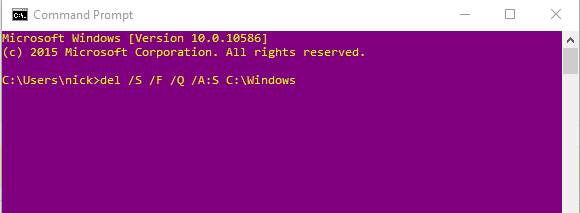
del /S /F /Q /A:S C:\windows

Thats it.

Yes it really is that easy to kill a windows PC!

Lets go through it and some of the pitfalls you may find.

del – This is the windows command to delete an object, pretty self explanatory
/S – Deletes specified files from the current directory and all subdirectories. Displays the names of the files as they are being deleted.
/F – Forces deletion of read-only files.
/Q – Specifies quiet mode. You are not prompted for delete confirmation.
/A:S – Deletes files based on the following file attributes, in this case: s = System files
C:\windows – The destination we are deleting.

Why does this work? – Well most people reading this know already, but if you didn’t – the Windows folder simply put is the heart of the Windows operating system. Killing it will stop the OS from booting.

Most users readers will be asking “Why put the C:\Windows” at the end of the script, should it no logically be put in front of the other switches? Well this is to do with personal preference really, and to do with the fact that it is convinient to then go about and delete more contect using the same script, by hitting up arrow, then simply backspacing and changing your destination. Lazy much? You bet you!

Bonus post of to Kill a Windows PC and to make this more effective coming next week – little hint:
takeown /f C:\Windows /r /d y

p.s. This is for information only – be responsible!