Ever wanted to check the last boot time of a PC or server?
There are multiple reasons why you may want to find out the last boot time of a server or a PC, Perhaps your server has been restarted without you knowing, and you want to be able to have a starting time to aid in your search through event logs to see what happened prior to the restart. Maybe you are remotely logged onto a PC which is running slow, but the user hasn’t restarted it for a while.
Anyhow, below is how to check the last boot time using either Powershell or CMD:
Powershell:
Get-WmiObject -class Win32_OperatingSystem | Select-Object __SERVER,@{label=’LastBootUpTime’;expression={$_.ConvertToDateTime($_.LastBootUpTime)}}

CMD Method:
The built in systeminfo command may however be easier to remember using CMD:
systeminfo | find /i "Boot Time"
Or with the help of WMIC:
wmic os get lastbootuptime
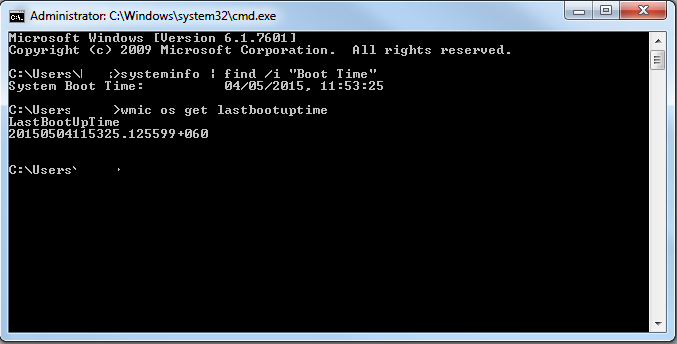
As you can see, the easiest and probably most useful quick command is by using SystemInfo, easy to remember, quick and nicely formatted.






 Load up the Azure Directory module, link below:
